
Stage and Sound
This page covers stage mode, a full-screen view like a visual novel. It also covers the two built-in plugins that make the view more complete: Scene Stage and Soundtrack.
| Plugin | In short |
|---|---|
Scene Stage (scene-stage) | Records the current scene, day or night, and the characters on stage, for the stage to use |
Soundtrack (soundtrack) | Plays the world's background music to match the scene and mood |
Stage mode
Stage mode turns a game into a full-screen visual novel picture.
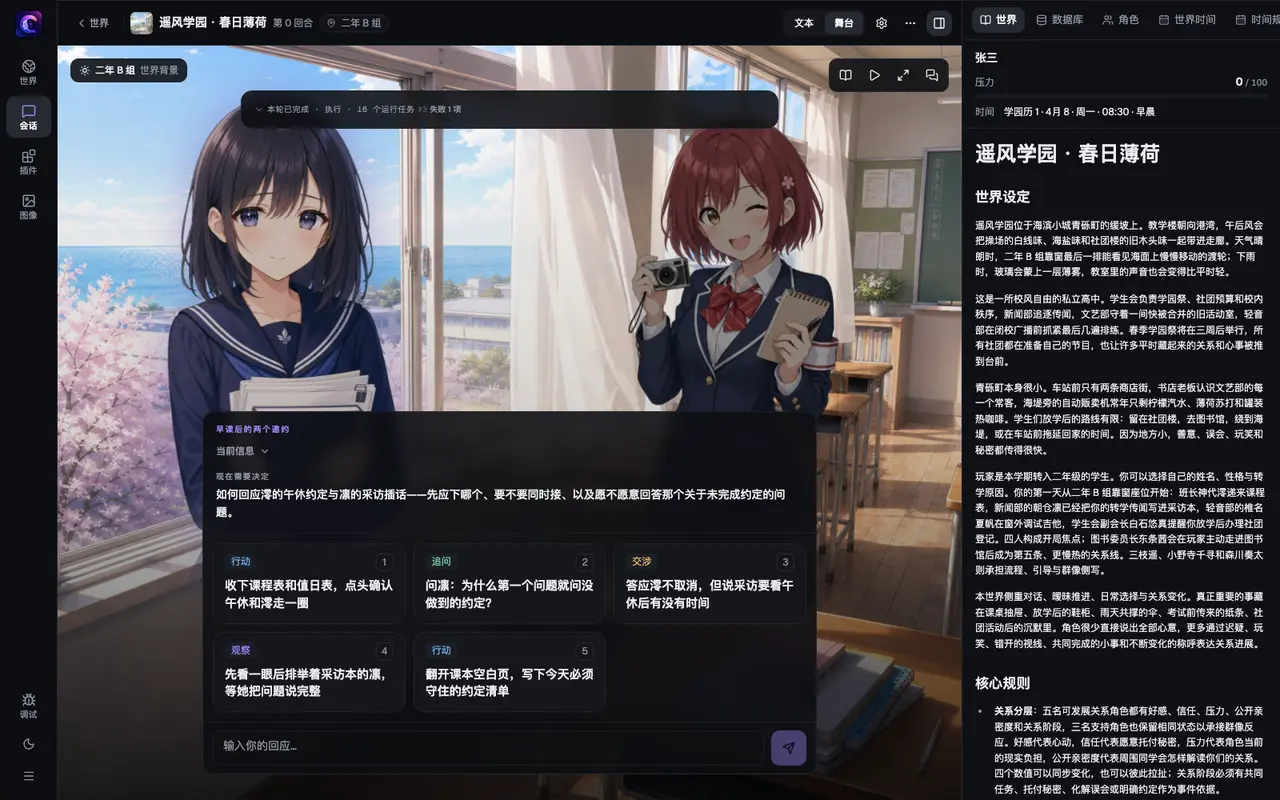
You will see:
- Background: a picture of the current scene. It can differ between day and night.
- Portraits: the characters on stage stand in front of the background. The character who is speaking is highlighted.
- Dialogue box: the story text is shown one paragraph at a time, with the speaker's name beside it (taken from the story's segments, shown once the story is complete). Click the screen to go to the next paragraph.
- Choices: when you need to decide, possible responses appear below the dialogue box. You can also click "✎ Write your own…" and write your own words.
The name of the current scene is shown on the screen. A row of small buttons lets you open "History" (to look back at the conversation), turn "Auto-play" on or off, or enter "Fullscreen stage". To go back to the text view, click "Exit stage".
How to switch
At the top of the game screen there are two buttons side by side: "Text" and "Stage". Click "Stage" to enter stage mode, and "Text" to go back to the text view. Switching does not affect your save, and you can switch back and forth at any time.
What the world needs to provide
Stage mode needs no extra setup on its own, but how complete the picture is depends on what the world includes:
| What the world includes | Effect on the stage | How to do it |
|---|---|---|
| Scene pictures | When the story moves to a place, the background changes to that place's picture | Add scene pictures to a world |
| Character portraits | Characters stand in front of the scene | Add portraits to characters |
| Neither | The stage still works, but the background falls back to the world's cover, and there are no portraits | - |
The scene picture and on-stage character data come from Scene Stage below. Enable it on the session-prep screen for scene backdrops and on-stage characters. You can still read the story in stage mode without it.
Scene Stage (scene-stage)
Lets the stage know where things are, whether it is day or night, and who is present.
What you will see
- The background and portraits on the stage come from this plugin. Speaker name tags come from the narrator's story segments and do not need it.
- Dialogue segments in chat gain a speaker nameplate and an avatar when one is available. Stories without segments still use the normal text view.
- On the right there is a "Scene" tab. It contains a read-only "Scene" panel (the scene name, day or night, and where the background comes from) and a "Cast" panel. The "Cast" panel also says why each character was chosen, for example "Mentioned", "In scene", "Profile", or "Recent".
- If the place cannot be found in the world's scene pictures, the background shows "No backdrop", and the stage uses the world's cover instead.
- The story's
cues.scene, written when the location changes, selects the location and non-emptycues.presentselects who is on stage. Updates commit with the story. Continuing actors keep their position and visual; new actors fade into free positions from left to right, and absent actors leave the stage at once when the update commits, without a fade. At most four actors appear, with focus on the last resolved dialogue or action speaker on stage. - The current viewpoint character stays off stage; other characters bound to the same player seat can appear. A location change clears old actors before applying the new presence list. Day/night changes at the same location keep the actors. Without a presence list, existing actors remain unless the scene changes; cast selection applies until an actor record exists.
When it is on
Optional. The built-in "Dialogue Mode" gameplay pack includes it. The "Campus Romance · Visual Novel" pack for Harukaze Academy also includes it.
What you can change
| Name | What it does | Default |
|---|---|---|
| Active speakers | How many NPCs to recommend as the main participants in this turn, from 1 to 4. This does not cap the story’s cast. | 2 |
World authors can set a different default for this world in pluginSettings.scene-stage.activeSpeakerCount in world.yaml.
What world authors can preset
| Content | File | Notes |
|---|---|---|
| Scene background images | media/scenes/ | Put only image files here. The index is created on import. |
| Scene registry | media/scenes.registry.json | Do not write this by hand. A script generates it. See the link below. |
For how to do it, see Add scene pictures to a world. For field details, see World data.
Notes
- At the start, if the story has not said where it is, the stage uses the first scene in the scene registry. So the screen is never blank at the beginning.
- Places are matched by name. See The name decides whether the background changes for naming advice and examples. A location name that is too short cannot select one background when several scenes contain it. Use the full name.
cues.scenecan be omitted while the location stays the same. It has no time of day, so scene changes keep the current day/night variant. Usescene.setfor day/night changes andstage.directionfor position, focus, and visual changes. Explicit events from the same turn run after story cues and override the corresponding results. Event previews remain available; story cues appear after commit.- Without a story or relevant
cues, the plugin succeeds with a recorded skip reason. It does not require a narrator plugin to be enabled.
Soundtrack (soundtrack)
Plays the world's own background music. When the story moves to a new place, or the mood clearly changes (for example, entering a battle), the music changes to match.
What you will see
There is no panel. A speaker button at the top of the game screen lets you "Mute the music" or "Play the music". Music fades in and out when it changes.
When it is on
Optional. No built-in gameplay pack selects it. You have to tick it yourself in the plugin list on the session-prep screen. None of the built-in worlds includes music yet, so it only makes sound if you install or make a world that has music.
What you can change
The plugin itself has no settings. The music on/off switch and the volume are in the app's settings:
| Name | What it does | Notes |
|---|---|---|
| Background music | Whether background music plays during the game | It is the same switch as the speaker button at the top of the game screen. |
| Music volume | 0 to 100 | When narration voice plays, the music is lowered automatically. |
What world authors can preset
| Content | File | Notes |
|---|---|---|
| Music files | media/music/ | .mp3 or .wav. Put only the files here. |
| Track list | media/music.yaml | For each track, the file, the scene, the mood, and which one is the theme song |
In the track list, you name the moods yourself. Use the top-level moods to say when each mood applies. The story writes its mood in cues.mood when the mood changes and omits it otherwise; Soundtrack matches the list ignoring case and whitespace, then records the listed spelling. An unknown mood keeps the current music and records a reason. Here is a minimal example:
schemaVersion: 1
registryId: music-registry
tracks:
  - id: tavern
    file: tavern.mp3
    scenes: [歪角鹿酒馆]
  - id: theme
    file: theme.mp3
    theme: true
Tracks near the top of the list take priority. The first matching track is chosen in this order:
- A track that matches the current mood and also belongs to the current scene.
- A track that matches the current mood, with no scene limit.
- The track that belongs to the current scene.
- A theme track marked
theme: true. - If nothing fits, it stays silent.
A mood written as silence stops the music. If no track has a mood, the music follows only the scene and the theme song. For the full format, see the plugin README.
Works with
Soundtrack reads the story's cues.scene and cues.mood directly and keeps the current location or mood when its cue is omitted, so it can follow locations without Scene Stage. Updates commit with the story. Without a story, relevant cues, a state change, or a world track list, it succeeds with a recorded skip reason.
Stories that do not answer in segments can still emit music.cue; worlds and plugins can still use scene.set to set the music scene. Explicit events from the same turn run after story cues and override the corresponding mood or scene. Story cues have no pre-commit preview; existing event previews remain available.
Next
- Built-in app features: besides the text and stage views, what else the app offers.
- Add scene pictures to a world
- Add portraits to characters
Ensemble nameplates and presence
The story attaches canonical names to actor speech/actions; the stage still consumes public segments and cues for nameplates. A silent or failed actor can remain present. Stage salience settings are separate from execution caps in Orchestration. Delegation also works without the stage, using the dialogue planner's candidate heuristic.